by James Turner
The landscape of artificial intelligence is vast, but not every application requires a massive, complex Large Language Model (LLM). For many web-based tasks—customer service, guided tutorials, or interactive documentation—a lightweight, configuration-driven chatbot provides the perfect balance of flexibility, performance, and maintainability. This foundational approach dictates that the 'intelligence' and behavior of the chatbot are entirely defined by a simple, readable configuration file, removing the need for heavy backend infrastructure or expensive API calls. This configuration file, often referred to as an 'AI Modal,' serves as the brain of the chatbot. It holds all the rules, personality definitions, response templates, and functional instructions the client-side JavaScript engine needs to operate. By externalizing the AI's core logic into a declarative file format like JSON, we achieve unparalleled agility. Developers can modify the chatbot's behavior instantly, merely by updating this file, without touching the underlying application code or deploying a new model. This principle is fundamental to creating scalable and adaptable web experiences. Our journey throughout this guide focuses specifically on harnessing the power of JSON to encapsulate AI behavior. We treat JSON not just as a data exchange format, but as a sophisticated scripting language for conversational logic. Imagine being able to define complex decision trees, user query triggers, and personalized responses, all within structured objects and arrays. This method empowers content creators and domain experts, who may not be deep software engineers, to directly influence and refine the chatbot's performance, leading to a truly collaborative development process. The true innovation here lies in simulating high-level conversational intelligence using only front-end technology. While a traditional LLM generates novel responses, our JSON modal guides deterministic or probabilistic responses based on highly refined rules and context matching. This is highly effective for focused applications where the scope of conversation is defined, such as a product support bot or a site navigation helper. This approach drastically reduces latency, ensures predictable outcomes, and lowers operating costs, making it an ideal choice for high-traffic websites that prioritize speed and reliability. Furthermore, leveraging a configuration modal enhances transparency and debugging capabilities. Since every piece of logic is explicitly written down in the JSON structure, tracking why the bot chose a specific response becomes straightforward. Developers can quickly identify and adjust flawed logic paths or inadequate response templates simply by inspecting the modal file. This contrasts sharply with debugging black-box LLM interactions, where the reasoning behind a generated output can often be opaque. We are essentially building a highly sophisticated state machine, driven entirely by human-readable configuration data.
Configuration-driven architecture is a core tenet of modern software development, but applying it to AI requires a philosophical shift. Instead of training a model on billions of parameters and hoping it derives the desired behavior, we explicitly mandate that behavior through structured data. This methodology prioritizes predictability over generativity. In many enterprise environments, predictability—ensuring the bot never veers off-topic or provides incorrect, fabricated information—is far more valuable than the ability to generate novel, yet potentially unreliable, text. This approach democratizes AI implementation. By relying on a JSON file, the barrier to entry for developing and maintaining a functional chatbot is significantly lowered. You don't need access to specialized GPU clusters or complex machine learning frameworks. Any developer familiar with basic web technologies—HTML, CSS, and JavaScript—can immediately begin building, deploying, and iterating on sophisticated conversational agents. This flexibility means smaller teams and independent creators can deploy powerful AI tools without significant capital investment. The configuration modal enforces modularity. Within the JSON structure, specific conversational domains, such as 'Troubleshooting,' 'Product Details,' or 'Account Management,' can be isolated into distinct objects or arrays. This compartmentalization allows for easier updates; if a product line changes, only the JSON segment pertaining to that product needs modification. This contrasts with monolithic systems where a single change might necessitate retraining or redeploying the entire model, a process that is both time-consuming and risky. Furthermore, the configuration-driven philosophy embraces the concept of 'AI as documentation.' The JSON modal itself becomes the most accurate, up-to-date documentation regarding the chatbot's capabilities and current operational scope. Stakeholders, quality assurance teams, and future developers can read the file to understand exactly what inputs trigger what outputs. This transparency fosters trust in the system and minimizes the common challenge of understanding proprietary or opaque model behaviors, which are prevalent in deep learning systems. Ultimately, this architectural choice acknowledges the fundamental limitation of client-side processing: heavy LLMs cannot run efficiently in a browser. Instead of attempting the impossible, we optimize the interaction layer. The JSON modal acts as a sophisticated rule engine that provides instantaneous, high-fidelity, and controlled responses, providing the illusion of advanced AI processing while maintaining the light footprint necessary for optimal web performance. This deliberate constraint leads to superior user experience in targeted, specific use cases.
JavaScript Object Notation (JSON) has become the lingua franca of data exchange on the modern web, and its suitability for defining AI modals is unparalleled. Its inherent simplicity and lightweight structure make it easy for both humans to read and machines to parse, which is a non-negotiable requirement for configuration files that dictate complex logic. Since our chatbot engine will be implemented in JavaScript, JSON’s native integration—it is essentially a subset of JavaScript object literal syntax—means parsing overhead is minimal and efficient, ensuring near-instantaneous load times for the AI configuration. One of JSON's primary advantages in this context is its structural flexibility. It natively supports nested objects and arrays, which are essential for defining the hierarchical and relational nature of conversational flow. For instance, we can define a top-level `personality` object, which contains sub-properties like `tone` and `systemPrompt`. We can then create a `responseTriggers` array, where each element is an object detailing a specific user input pattern, the corresponding required context, and a list of potential responses. This nesting is crucial for representing complex decision paths in a clean, organized manner. Compared to alternative formats like XML or YAML, JSON offers a superior balance between verbosity and readability. XML often introduces excessive boilerplate and structural complexity, while YAML, although cleaner, can sometimes suffer from ambiguity in type definition and is not natively supported by the browser's JavaScript engine in the same direct manner as JSON. JSON’s strict syntax rules prevent common configuration errors and ensure that the modal remains syntactically valid and reliable upon loading. Furthermore, the ubiquity of JSON means there is a vast ecosystem of tools, validators, and schema definitions (JSON Schema) available to ensure the integrity of the modal file. Before the chatbot even attempts to use the configuration, robust JavaScript libraries can validate the modal against a predefined schema, ensuring that all required fields are present and correctly formatted. This pre-flight check significantly reduces runtime errors and improves the stability of the entire chatbot system, making maintenance far more manageable. In essence, JSON allows us to treat the AI modal as executable data. By standardizing the format, we ensure that any website, regardless of its backend (or lack thereof, in our case), can load and execute the conversational logic. This commitment to JSON as the primary configuration mechanism is the bedrock upon which we will build a robust, powerful, and easily maintainable AI chatbot experience.
A configuration-driven chatbot, despite its lightweight nature, comprises several critical components that must work in concert to deliver a seamless user experience. Understanding these parts is essential before diving into development. The first component is the User Interface (UI) Layer, which consists of the HTML and CSS necessary to present the chat window, the message history, and the input field. This layer is responsible purely for presentation and gathering user input, serving as the front face of the application. The second key component is the Data Loading and Parsing Layer. This is the JavaScript module responsible for retrieving the AI Modal JSON file from its remote location (often a simple static file server) using asynchronous methods like the Fetch API. Crucially, this layer must not only load the data but also rigorously parse it, ensuring the JSON is valid and structurally conforms to the expected schema before the chatbot can initialize. If the modal fails to load or parse, this component must implement graceful fallback mechanisms. The third and perhaps most complex component is the Conversational Logic Engine. This JavaScript engine utilizes the configuration loaded from the JSON modal to manage the dialogue flow. It handles several vital tasks: identifying user intent (through keyword matching or basic pattern recognition defined in the JSON), managing the conversational history (context management), selecting the most appropriate predefined response, and executing any required functional calls (like fetching simulated external data or manipulating the DOM). Crucially integrated with the Conversational Logic Engine is the Context and State Manager. Since our system is client-side, maintaining the state of the conversation—what the user has asked, what the bot has answered, and any key facts gathered (like a user ID or a selected topic)—is vital for coherent interaction. This state must be referenced by the logic engine when determining the next response. For example, if the JSON dictates that the bot should only answer a question about 'Product B' if the user has previously mentioned 'Product A,' the state manager facilitates this complex condition check. Finally, the Response Generation and Rendering Layer takes the selected template or text from the JSON modal and prepares it for display. This includes formatting the text (e.g., converting simple Markdown stored in the JSON into HTML), handling display speed (simulating typing delay for realism), and injecting the final formatted message back into the UI layer. These five interconnected systems—UI, Loading, Logic, State, and Rendering—form the complete architecture of our configuration-driven AI chatbot.
Before we begin writing code, establishing a clean, efficient development environment is paramount. While our project is client-side focused, relying only on HTML, CSS, and JavaScript, using proper tools will significantly streamline development, testing, and debugging. You will need a reliable code editor, such as Visual Studio Code, which offers excellent syntax highlighting, code completion, and integrated terminal support. This provides the foundation for writing and managing the three main files: `index.html`, `style.css`, and `app.js`. The crucial environmental step is setting up a local web server. Browsers enforce strict security policies, notably the Same-Origin Policy, which often prevents local files (`file://` URLs) from making necessary AJAX requests to load external data, including our AI Modal JSON file. Using a simple local server, even one provided by a code editor extension (like VS Code’s Live Server) or a command-line tool (like Python’s `http.server`), bypasses this restriction and accurately simulates the deployment environment. This ensures that the fetching of the JSON modal works correctly from the outset. Organizationally, keeping the project structure logical is vital for long-term maintainability. We recommend the following structure: a root directory (e.g., `ai-chatbot/`), containing `index.html`, a `css/` folder for `style.css`, a `js/` folder for `app.js`, and crucially, a `modals/` folder where our JSON configuration files, such as `my-ai-modal.json`, will reside. This separation of concerns—HTML for structure, CSS for presentation, JavaScript for behavior, and JSON for configuration—is the hallmark of good web engineering practice. Once the foundational files and the local server are in place, focus on setting up basic debugging tools. Browsers like Chrome or Firefox include powerful Developer Tools that will be indispensable. We will heavily rely on the Console for monitoring JavaScript execution, logging variable states, and tracking errors during JSON parsing. We will use the Network tab to confirm that the AI Modal JSON file is being fetched successfully and efficiently, paying close attention to status codes and file sizes. Finally, establishing version control using Git is highly recommended. Even for a seemingly small client-side project, Git allows you to track changes to the JSON modal, the conversational logic, and the UI code independently. This provides a safety net, allowing you to easily revert to a previous working state if a modification to the AI Modal configuration introduces unexpected behavior. A robust setup environment is the key to minimizing friction and maximizing efficiency throughout the subsequent complex stages of development.
The HTML structure, defined in `index.html`, is the backbone of our chatbot application. It must be clean, semantic, and provide clear anchors for the JavaScript to manipulate the display. We start with the essential boilerplate: ``, setting up the language, and including meta tags for responsiveness and character encoding (``, ``). Critically, we link our CSS file and defer the loading of our primary JavaScript file until the end of the `
` using the `defer` attribute, ensuring the DOM is fully loaded before our script attempts to interact with it. The central component of our design is the chat container. This is typically a single `div` element that encapsulates the entire application, serving as the main viewport. Inside this container, we must define two primary areas: the message display area and the input control area. We recommend using descriptive IDs for these elements, such as `id='chat-window'` for the main scrolling area and `id='input-form'` or `id='chat-controls'` for the section containing the text input and send button. Within the message display area (`chat-window`), it is crucial to designate a dedicated `div` container, perhaps `id='message-history'`, where all incoming and outgoing messages will be dynamically injected by JavaScript. This container needs to be styled to scroll vertically and maintain its position at the bottom of the latest message, providing the classic chat experience. Each individual message will also need a standardized structure, perhaps wrapped in a `div` with a class like `message` and additional classes to distinguish the sender, such as `user-message` or `ai-message`, simplifying the styling process. The input control area requires careful planning to ensure usability. It should contain a primary text input field (using the `<input type='text'>` or a multi-line `< textarea>`) and a submission button. It is standard practice to wrap these in a `<form>` element, even if we prevent the default submission behavior, as forms offer benefits like easy management of input focus and handling the 'Enter' key press event. Assigning unique IDs like `user-input` and `send-button` is necessary for JavaScript to attach event listeners and retrieve the user's query. Finally, we should include placeholders for potential future elements, such as a 'typing indicator' or a status bar, even if initially hidden with CSS. A dedicated `div` with `id='status-indicator'` can be toggled by the JavaScript engine to show when the chatbot is processing the request or loading the modal. Structuring the HTML with clear semantic intent and easily identifiable hooks (IDs) ensures that the subsequent CSS styling and JavaScript manipulation stages are efficient and less error-prone. This semantic foundation is the first critical step toward a successful, configuration-driven chatbot application.The effectiveness of any chatbot is measured not just by its intelligence, but by the fluidity of its interface. The two most critical elements are the input mechanism and the message display area. The input mechanism must be intuitive and forgiving. While a simple `<input type='text'>` suffices for basic queries, a `<textarea>` is often preferred, particularly if we anticipate longer user inputs or want to allow users to press Shift+Enter for a newline without submitting the message. Ensuring the input field has an appropriate placeholder text (e.g., 'Ask me anything...') guides the user immediately. Effective input handling also means managing the associated submission button. While clicking the button is the most explicit way to submit, the most common user behavior is pressing the 'Enter' key. The JavaScript must capture this keydown event within the input form, prevent the default browser action (which often causes a page refresh), and trigger the function that processes the user query and initiates the AI response sequence. The button itself must be clearly labeled, perhaps with an icon (like an arrow or paper airplane), and its disabled state should be managed when the bot is processing a response to prevent redundant submissions. Turning our attention to the message display area, the core challenge is managing the visual flow of dialogue. Messages need to be clearly demarcated between the user and the AI. This is achieved through distinctive styling, usually involving background colors, alignment (user messages right-aligned, AI messages left-aligned), and perhaps small avatar icons. The structure of each message element must accommodate both the text content and metadata, such as timestamps (even if simulated). Furthermore, the message display must handle varied content types. While the core of the JSON modal deals with text, the logic engine must be able to render basic formatting. This means designing the message structure to properly handle Markdown elements (like bold text or bulleted lists) that we store in our JSON configuration. A dedicated function in JavaScript will convert these Markdown snippets into corresponding HTML tags (e.g., `text` to `text`) before insertion into the `message-history` container, ensuring the AI's responses are visually engaging and easy to digest. Finally, scrolling management is paramount. Every time a new message is added, the `chat-window` must automatically scroll to the bottom to ensure the user sees the latest exchange without manual intervention. This usually involves querying the scroll height property of the container and setting the scroll top property to the maximum value. This small detail dramatically improves the perceived responsiveness and quality of the entire chatbot interface, transforming a static content window into a dynamic conversational interface.
A well-designed chatbot must look professional and operate seamlessly across all devices, from desktop monitors to mobile phones. This chapter focuses on the crucial role of CSS in establishing a robust and responsive layout. We begin by applying a global reset or normalization to ensure consistent rendering across different browsers, removing default margins and padding that often interfere with precise layout control. We will use modern CSS features, specifically Flexbox and Grid, to manage the chat application's overall structure. For the main container, the use of CSS Grid or Flexbox is ideal for dividing the screen space effectively. A common pattern involves setting the entire application container to 100% of the viewport height and width (`height: 100vh; width: 100vw;`). Then, we use Flexbox set to `flex-direction: column;` to arrange the three main sections vertically: an optional header (for branding or title), the central `message-history` container, and the footer containing the input form. This ensures these components stack correctly and utilize the available vertical space efficiently. The central `message-history` section is the core layout challenge. It must occupy the remaining available space after the header and footer heights are fixed. Using Flexbox's `flex-grow: 1;` property on this element allows it to dynamically expand, while ensuring the header and input remain fixed in size. Crucially, we must set `overflow-y: auto;` on the `message-history` container to enable the required vertical scrolling, preventing the chat window from expanding beyond the screen boundaries as messages accumulate. Responsiveness is built into the layout from the start. On mobile devices, the chat window should utilize nearly the full screen. On larger desktop displays, we might want the chat window contained within a smaller, centered modal or fixed-size box to prevent it from stretching too wide, which can hurt readability. This is easily achieved using CSS media queries. For instance, we can set a `max-width` on the main container for screens wider than 768px and center it using `margin: 0 auto;`. Finally, attention must be paid to the input area layout. The input field and the send button should be neatly aligned horizontally. Using Flexbox within the input form ensures that the text input takes up most of the space (`flex-grow: 1;`) while the send button remains fixed in size, providing a clean, professional appearance. Consistent padding and margins around all elements prevent content from feeling cramped and improve overall aesthetic quality and usability.
Moving beyond the structural layout, this chapter focuses on applying specific styles to the individual components, bringing visual distinction and personality to the chatbot interface. The choices we make here—color palettes, typography, and element treatments—can significantly influence user perception of the AI’s brand and trustworthiness, and should ideally align with the system prompt defined later in our JSON modal. Message bubbles are the defining element of the interface. We must establish clear visual differentiation between user and AI messages. User messages typically use a primary or accent color (e.g., blue), are aligned to the right using `text-align: right;` or `justify-content: flex-end;` within the message container, and might feature rounded corners on the top-left and bottom-left, maintaining a more square corner on the submission side. Conversely, AI messages should use a neutral background (e.g., light gray or white), be left-aligned, and have their rounded corners mirrored. Typography plays a massive role in readability. Choose a clean, legible font family that renders well on both desktop and mobile devices. Define clear hierarchy: the body text of the messages should be sized appropriately for comfortable reading, while any labels or timestamps can be slightly smaller and muted in color. Line height should be generous enough to prevent large blocks of text from feeling dense, which is especially important since our AI responses from the JSON modal can sometimes be lengthy and detailed. Visual feedback mechanisms are crucial for perceived speed and engagement. The input field styling should clearly indicate focus (e.g., a subtle border color change when clicked). More importantly, the submission button should react visually to user interaction. Using CSS `:hover` and `:active` states to apply slight color changes or depressions gives the user immediate confirmation that their action has been registered. The styling for the processing indicator (the 'typing...' indicator) should be subtle yet noticeable, often involving pulsating dots or a gentle animation to signify that the AI logic engine is running. Finally, ensuring high contrast is essential for accessibility. While we want a pleasing aesthetic, the contrast ratio between the text color and the message background color must meet WCAG guidelines (a minimum ratio of 4.5:1) to ensure all users can easily read the conversation. This detailed styling process ensures that the raw data and logic defined in the JSON modal are presented to the user in a professional, accessible, and engaging manner, maximizing the overall user experience.
Building a configuration-driven chatbot on modern web principles necessitates strict adherence to accessibility standards and general best practices. Accessibility, often abbreviated as A11Y, ensures that users relying on assistive technologies, such as screen readers or keyboard navigation, can fully interact with the chat interface. Failing to account for A11Y is not only exclusionary but also negatively impacts the overall quality and legal compliance of the web application. Central to accessibility in a dynamic chat interface is the correct use of ARIA (Accessible Rich Internet Applications) roles and attributes. Since the message history is constantly being updated by JavaScript, traditional screen readers might miss new content. We must designate the message display area with an appropriate ARIA role, such as `role='log'` or `role='status'`, and use `aria-live='polite'` to instruct the screen reader to announce new messages as they arrive without overly interrupting the user's flow. This ensures that every AI response is verbally communicated to users relying on non-visual browsing. Keyboard navigation must be seamless. Users should be able to easily navigate to the input field and the send button using only the Tab key. Ensure that the form elements are properly structured within the tab order. Furthermore, provide clear visual focus indicators (the outline typically provided by the browser) for all interactive elements, making sure they are highly visible when the element receives focus, catering to users who use keyboards or switch devices. Adherence to modern web standards also encompasses optimization. Even though our AI is client-side, we must optimize asset delivery. Ensure the CSS file is minified and the JavaScript file is properly bundled and optimized. Since the core intelligence is held in the JSON modal, attention must be paid to its size. While configuration files tend to be small, if the modal grows excessively large (e.g., hundreds of KB), strategies like Gzip compression on the server side or lazy loading large, non-essential parts of the configuration should be considered to minimize initial load latency. Finally, adopting semantic HTML ensures search engines and assistive technologies interpret the page structure correctly. Use `<button>` elements for buttons, `<label>` elements correctly associated with input fields, and structure the conversation display logically. Combining these elements—semantic structure, appropriate ARIA roles, and performance optimization—ensures our configuration-driven chatbot is not only fast and functional but also universally usable, reflecting a high standard of professional development.
JavaScript is the lifeblood of our configuration-driven chatbot; it acts as the bridge between the static HTML/CSS presentation and the dynamic logic defined in the AI Modal JSON. It is the engine responsible for fetching the configuration, interpreting user input, executing the conversational rules, and dynamically updating the Document Object Model (DOM) to display the resulting dialogue. Mastery of asynchronous operations and DOM manipulation in JavaScript is non-negotiable for this project. Our JavaScript code, typically contained in `app.js`, will start by defining the application's overall state and initializing event listeners. The initialization sequence is critical: first, it confirms that the entire DOM is loaded; second, it attempts to load the external AI Modal JSON file; and third, upon successful loading and parsing, it initializes the main conversational logic handler. If the JSON loading fails, the JavaScript engine must gracefully fail, perhaps displaying a predetermined static error message in the chat window or disabling the input field. A core principle we will enforce is the separation of concerns within the JavaScript architecture itself. We should not mix the UI update logic with the conversational decision-making logic. We will define distinct functions or, preferably, classes: one for managing the UI (e.g., `ChatUIManager`), one for handling data fetching and validation (`ModalLoader`), and one for executing the core rules based on the JSON configuration (`ConversationalEngine`). This modular approach makes the code easier to test, debug, and scale as the complexity of the AI Modal grows. Event listeners form the basis of all interaction. The primary listeners are attached to the input form submission (both the button click and the 'Enter' key press). When triggered, these listeners call the `ConversationalEngine`, passing the user's query. This initiates the entire AI cycle: context lookup, rule matching against the JSON, response selection, and finally, calling back to the `ChatUIManager` to render the results. Managing these events efficiently is crucial for a responsive feel. Effective error management in JavaScript is paramount, particularly when dealing with external files like our JSON modal. We must wrap asynchronous operations in `try...catch` blocks to handle network failures or malformed JSON syntax. If JavaScript attempts to access a property in the configuration that doesn't exist (due to a typo in the JSON), robust code must check for the existence of variables before using them (e.g., using optional chaining or defensive programming checks), preventing the entire application from crashing. This defensive coding posture ensures the chatbot remains resilient even if the external configuration file is imperfectly authored.
The ability to load our AI Modal JSON configuration dynamically from a remote location is handled by asynchronous data fetching. In modern JavaScript development, the Fetch API is the standard tool for this task, replacing older methods like XMLHttpRequest due to its promise-based structure, which leads to cleaner, more readable asynchronous code. The loading process must be robust, as the chatbot cannot function without its brain (the JSON modal). The basic implementation involves calling `fetch(url)` where `url` points to the location of our JSON file (e.g., `modals/my-ai-modal.json`). This function returns a Promise that resolves to the `Response` object. The first crucial step is error checking: we must inspect the `response.ok` property. If the file is not found (404) or a server error occurs (500), the Promise should reject, and our code must handle this gracefully, informing the user that the AI is unavailable rather than crashing. Once the response is confirmed successful, we utilize the `response.json()` method. This second step parses the received network stream into a native JavaScript object, which is the exact structure we need to power the conversational engine. Because `response.json()` is also asynchronous, we typically chain these operations using `.then()` blocks or, more commonly in modern code, utilize the `async/await` syntax within an initialization function, which simplifies the flow and makes the asynchronous process appear synchronous. It is imperative to manage loading state. While the JSON is being fetched, the user should be aware of the wait time. This involves temporarily displaying a loading indicator or disabling the input field. Once the Promise resolves successfully and the data is parsed, the loading indicator is dismissed, and the input field is enabled. This user experience detail prevents the user from attempting to interact with a non-operational chatbot. Furthermore, the chosen URL for the modal (which could be the previously mentioned external link: `https://xpdevs.github.io/Genesis-AI/modals/Genesis-SPT-1.0.json`) must be managed as a configuration parameter within the JavaScript. This allows for easy swapping of different AI modal personalities or functionalities without modifying the core fetching logic. Robust implementation of the Fetch API ensures that our chatbot can acquire its intelligence dynamically and reliably from any accessible web location.
Receiving the JSON data from the Fetch API is only the first step; the data must then be rigorously parsed and validated before being trusted by the Conversational Logic Engine. Parsing transforms the raw text stream into usable JavaScript objects, but validation confirms that the structure and data types within that object conform exactly to what our JavaScript engine expects. A malformed or incomplete modal can lead to unpredictable behavior or outright application failure. Initial parsing is handled efficiently by the Fetch API's `response.json()` method. However, we must implement custom structural validation immediately afterward. This involves manually checking for the existence of critical, top-level keys defined in our schema, such as `personality`, `systemPrompt`, and `responseTriggers`. For example, the code should check: `if (!modalData || !modalData.systemPrompt || !Array.isArray(modalData.responseTriggers)) { throw new Error('Invalid Modal Structure'); }`. Beyond simply checking for existence, we must validate data types. The `systemPrompt` should be a string, and `responseTriggers` must be an array of objects. Iterating through the array and checking that each trigger object contains required nested keys, like `keyword` (a string) and `responseTemplates` (an array of strings), guarantees data integrity. If validation fails at any point, the entire loading process must be aborted, and a detailed error should be logged to the console, while a user-friendly error message is displayed on the screen. For highly complex modals, manual validation can become cumbersome and error-prone. In such cases, leveraging external JSON Schema validators, even if bundled and run client-side, is beneficial. JSON Schema provides a formal, declarative way to describe the required structure, data types, and constraints for the JSON configuration. The JavaScript can load this schema alongside the modal and use a library like Ajv (Another JSON Schema Validator) to programmatically check compliance, offering a high degree of confidence in the integrity of the AI configuration. Successfully validated data is then assigned to a global or class property, making it accessible throughout the application lifecycle. This verified JavaScript object represents the totality of the AI's knowledge and behavior. This rigorous process of parsing and validation is the firewall that protects the application logic from configuration errors, ensuring the chatbot operates with the precise intelligence defined by the modal author.
The Document Object Model (DOM) is the browser’s representation of the HTML document, and skillful manipulation of the DOM using JavaScript is fundamental to creating the dynamic, responsive chat experience. Every message displayed, every indicator toggled, and every state change is achieved through carefully orchestrated DOM modifications. Efficiency and performance in DOM manipulation are crucial, as excessive or poorly executed changes can lead to slow, janky interfaces, especially when the message history grows large. When a user submits a query, and subsequently when the AI responds, the JavaScript engine must construct new HTML elements from scratch. This involves using methods like `document.createElement('div')` to create the container for the message, applying the correct classes (e.g., `user-message`, `ai-message`), setting the inner text using `element.textContent` or `element.innerHTML` (for formatted responses), and finally, appending this new element to the `message-history` container using `container.appendChild(newElement)`. Performance is optimized by minimizing repeated DOM access. It is best practice to construct the entire message element, including all its nested components, in memory first before appending the single, fully constructed element to the live DOM. Every time the DOM is modified, the browser potentially has to recalculate layout and repaint the screen, a costly operation. By inserting one large chunk rather than several small ones, we reduce these reflows and repaints, resulting in a smoother user experience. Beyond adding content, DOM manipulation is used for state changes. When the user clicks 'Send,' the input field should be immediately cleared and often disabled, and a 'typing indicator' element needs to be made visible. This involves accessing the relevant elements via their IDs (e.g., `document.getElementById('user-input')`) and modifying their properties, such as setting the `disabled` property to `true` or toggling CSS classes like `hidden` or `active`. Once the AI response is ready, the reverse operation occurs: the input is re-enabled, and the typing indicator is hidden. Crucially, remember the scrolling requirement discussed earlier. After appending a new message element, the JavaScript must immediately access the `message-history` container and programmatically set its `scrollTop` property to its maximum `scrollHeight`. This ensures that the viewport always tracks the most recent conversation turn. Mastering these precise techniques for creating, modifying, and efficiently injecting elements is the backbone of the client-side rendering pipeline.
The interaction loop begins with the user providing input, which triggers a sequence of events leading to the AI response. Handling these input events robustly and validating the user's query before processing is vital for system efficiency and security. We primarily focus on the two submission triggers: the click event on the send button and the keydown event (specifically the 'Enter' key) within the input field or form. Attaching the event listeners is the first step. For the form, using `formElement.addEventListener('submit', handlerFunction)` is often preferred, as it catches both button clicks and Enter key presses automatically. However, we must always call `event.preventDefault()` within the handler function to stop the browser from submitting the form conventionally and refreshing the page, which would destroy the current conversational state and undo all the dynamic content. Input validation, though simple in a client-side text application, is necessary to prevent unnecessary processing cycles. The primary validation is ensuring the input is not empty or composed only of whitespace. Before passing the query to the `ConversationalEngine`, the JavaScript should trim the input string and check its length. If the input is invalid, the function should halt, provide immediate visual feedback (e.g., shaking the input field or highlighting it red), and do not involve the AI logic engine at all. Once validated, the input must be immediately reflected in the message history as a 'user message.' This provides the user with immediate feedback that their query was received and acknowledged, even while the AI is processing the response. This instant rendering is an important aspect of perceived performance, bridging the slight delay required for the AI logic engine to select and format the appropriate response based on the JSON modal rules. Finally, robust input handling must manage state transitions. Upon successful submission, the input field should be cleared, the system must log the user's query into the internal history buffer (the conversational context), and the input mechanism should be disabled temporarily to prevent the user from spamming the system while the current response is being processed. This temporary lock ensures that the logic engine only handles one active query at a time, maintaining the integrity and sequence of the conversation flow.
The AI Modal JSON file is the intellectual core of the chatbot, requiring a carefully structured schema to organize complex conversational logic effectively. The root structure defines the global parameters and acts as the entry point for the JavaScript parsing engine. A well-designed schema ensures modularity, readability, and consistency, which are critical as the chatbot’s capabilities expand. At the highest level, the JSON should include metadata and configuration attributes. Essential root keys often include `modalName` (string, for identification), `version` (string, for tracking updates), and `lastUpdated` (timestamp, aiding debugging). More importantly, the root must contain the key structural components that define the AI's behavior: the `personality`, the `configuration` block for global settings, and the array that houses the core intelligence, which we will call `knowledgeBase` or `responseTriggers`. The `configuration` block holds global runtime settings that influence the engine’s behavior but are not part of the conversation content itself. Examples include `contextWindowSize` (integer, defining how many previous turns the bot considers), `defaultFallbackResponseId` (string, pointing to a specific response when no trigger matches), and `enableMarkdownParsing` (boolean, controlling formatting). Centralizing these operational parameters makes tuning the chatbot simple and immediate. The most substantial element at the root level is the array dedicated to knowledge and actions, our `responseTriggers`. This array dictates the entire conversational flow, with each object in the array representing a distinct intent, topic, or command. Each element must follow a uniform, highly structured sub-schema, detailing the pattern matching criteria, the required context checks, and the list of canned or parameterized responses, ensuring the logic engine knows exactly how to iterate and match. Establishing this root schema rigorously is essential for the validation step (Chapter 13). If the JavaScript engine expects a specific key, like `responseTriggers`, and it is missing or malformed, the entire system fails. Therefore, when designing this structure, consistency is prioritized over clever shortcuts. This root configuration transforms a simple data file into a sophisticated, executable configuration script, ready for interpretation by our JavaScript engine.
Even in a rule-based, configuration-driven chatbot, the perceived 'personality' is vital for user engagement. This personality is entirely defined within the JSON modal, primarily through the `personality` block and the crucial `systemPrompt`. While our chatbot is not an LLM receiving a prompt, the `systemPrompt` section serves an equivalent function: setting the tone, constraints, and operational guidelines for the responses selected from the `responseTriggers`. The `personality` object contains descriptive text that guides the selection and delivery of responses. It might include keys such as `tone` (e.g., 'professional,' 'casual,' 'humorous'), `role` (e.g., 'expert technical support engineer,' 'friendly historian'), and `disclaimer` (a short string used in initialization). Although the bot doesn't read these as instructions in the LLM sense, the developer creating the `responseTemplates` must adhere to these guidelines to ensure stylistic consistency across all predefined outputs. The `systemPrompt` field, often a long, multi-line string within the JSON, is the most important element for defining the bot's constraints. It acts as a set of immutable rules that the conversational logic engine is designed to enforce. Examples of rules dictated here include: 'Always be concise unless specific detail is requested,' 'Never invent external links,' or 'When uncertain, always suggest contacting human support.' This text defines the 'behavioral boundaries' of the AI. Furthermore, the `systemPrompt` can define necessary context initialization. For instance, if the chatbot is strictly about one product, the prompt should state: 'You are an assistant for Product X only. Refuse to discuss competing products.' This constraint is translated into code where the logic engine checks for keywords outside the scope and uses a specific, predefined refusal response ID. The prompt guides the human author of the JSON content, ensuring they create template responses that fit the AI's intended persona. By centralizing personality and constraints in this section, we achieve uniform behavior across the entire modal. If the company decides to change the chatbot's tone from 'formal' to 'casual,' only the `personality` block needs updating, followed by a review of the `responseTemplates` to ensure compliance. This architectural decision makes rebranding and behavioral recalibration remarkably straightforward, demonstrating the power of externalized configuration.
A key limitation of purely rule-based systems is maintaining conversational coherence across multiple turns. Our configuration-driven chatbot overcomes this by defining explicit context requirements within the JSON modal. Context management ensures that the bot's responses are relevant not just to the current query, but to the ongoing flow of the conversation, simulating conversational 'memory.' Within our `responseTriggers` array, each individual trigger object should include an optional `contextRequired` property. This property can be an array of specific context flags or state variables that must be present in the user’s current session state before the trigger is eligible for activation. For example, a trigger for 'What are the installation steps?' should only activate if the context flag 'USER_HAS_SELECTED_PRODUCT' is set, ensuring the bot doesn't provide generic steps. Conversely, triggers must also define actions to set context flags. Each trigger object should include a `contextToSet` property, which is an array of strings representing flags to be added to the session state upon successful response delivery. For instance, after the bot answers a query about pricing, it might set the flag 'PRICING_DISCUSSED.' Subsequent triggers can then check for this flag to offer relevant follow-up questions or resources. The JavaScript logic engine is responsible for maintaining this session state, often storing the active context flags in a simple JavaScript object within the browser's Session Storage or as a global variable. When a new user query arrives, the engine iterates through all `responseTriggers`. It only considers triggers whose `contextRequired` array is a perfect subset of the current session state's flags, dramatically pruning the decision tree and increasing relevance. Furthermore, context management can handle context expiration or negation. The JSON schema can include a `contextToRemove` property in the trigger, used when a user explicitly changes topics (e.g., 'Forget Product A, tell me about Product B'). The corresponding trigger for the topic change would then remove the old product flag and set the new one. This sophisticated use of declarative context management within the JSON structure allows the chatbot to achieve surprisingly high levels of conversational flow and topical awareness without relying on complex, real-time natural language processing (NLP).
The quality of the AI Modal hinges on the richness and variety of its response templates. To prevent the chatbot from sounding repetitive and robotic, we must structure the JSON to allow for randomized, yet contextually appropriate, responses. This flexibility is defined within the `responseTemplates` array contained inside each `responseTrigger` object. For every single user intent or keyword match, the corresponding trigger should ideally contain multiple potential responses—at least three to five variations—all conveying the same core information but phrased differently. For example, if the intent is 'Greeting,' the `responseTemplates` array might contain: 'Hello! How may I assist you today?', 'Hi there! I'm ready to help. What's on your mind?', and 'Welcome! What brings you here?'. When the trigger is activated, the JavaScript engine randomly selects one response from this list, adding a vital element of naturalness to the interaction. Response templates should also support parameterization. Instead of simple static text, the JSON response can include placeholders that the JavaScript engine replaces with dynamic, context-specific information gathered from the user's session or the simulated external data (Faux API calls). For instance, a template might be: 'Your current account balance is [[ACCOUNT_BALANCE]]. Do you need help with anything else?' The engine would detect the `[[ACCOUNT_BALANCE]]` tag and substitute the actual value before rendering. Crucially, we must define robust fallback mechanisms. The `defaultFallbackResponseId` defined in the root configuration points to a specific, mandatory trigger object in the `responseTriggers` array. This trigger should have zero keyword requirements and zero context requirements, ensuring it is always the last resort. The responses here should clearly state the bot's limitations, offer to rephrase the query, or redirect the user to human assistance (e.g., 'I apologize, I don't have information on that topic. Can you try asking in a different way?'). Another layer of fallback is the local fallback within a specific trigger. If a trigger is activated, but perhaps a required parameter (like [[ACCOUNT_BALANCE]]) is missing because the Faux API call failed, the template selection logic should check for the presence of a dedicated `fallbackTemplate` within that specific trigger object. This ensures that even partially successful logic paths can still deliver a coherent message without crashing or reverting to the main system fallback.
To evolve beyond simple static responses, our AI Modal must define and execute custom actions, simulating the capability found in advanced LLMs known as 'function calling.' In our client-side context, these are not external API calls but declarations that instruct the JavaScript engine to run specific, pre-coded functions that perform logic or retrieve simulated data. Within the `responseTrigger` object, we introduce an optional key called `requiredActions`. This key contains an array of action objects. Each action object specifies the `functionName` (which must correspond to a function defined in our `app.js` file, such as `getAccountBalance` or `searchKnowledgeBase`), and an optional `parameters` object, containing variables needed for that function, which can be extracted from the user's query. The sequence of execution is critical: when the Conversational Engine identifies a matching trigger, it first checks the `requiredActions` array. For each action listed, the engine calls the corresponding JavaScript function. This function executes its logic (e.g., simulating a network request, performing a calculation, or setting a complex context flag) and returns a result. This result is then stored temporarily in the session state, usually under a key matching the `functionName` or a designated `outputKey` defined in the JSON. These actions serve several vital purposes. They enable the chatbot to demonstrate dynamic behavior, such as providing current, albeit simulated, data. For example, a trigger for 'Check my order status' might declare an action that calls `getOrderStatus(orderId)`. The JavaScript function would look up the ID, simulate the status lookup, and return a result string like 'ORDER_PENDING.' This result is then substituted into the corresponding response template using the parameterization technique from the previous chapter. Furthermore, custom actions can be used for UI manipulation declared in the JSON. An action like `showLoginPrompt` might instruct the JavaScript engine to dynamically display a hidden login form outside the chat window, rather than just returning a text response. By declaring these function calls explicitly in the JSON modal, we empower the configuration to dictate not just what the bot says, but what the application does, transforming the static modal into a truly dynamic configuration tool.
To solidify the concepts of schema design, we will walk through creating a minimal, functional JSON modal for a Basic Question-Answering (QA) Bot. This bot will focus on a limited set of FAQs, demonstrating the core structure of the `personality`, `configuration`, and initial `responseTriggers`. Start with the structural boilerplate. Define the root object and include metadata like the name and version, setting a foundation for the bot’s identity. The `personality` section should be concise: `{'tone': 'direct and helpful', 'role': 'basic information retrieval system', 'systemPrompt': 'Always provide clear, factual answers based only on your configured knowledge base.'}`. The `configuration` section sets the context window to a small size (e.g., 2) and defines a simple ID for the fallback response, confirming our global parameters are ready. Next, define the mandatory fallback trigger. This trigger is essential for resilience. It is defined as an object within the `responseTriggers` array, identified by the ID specified in the configuration (e.g., `FALLBACK_RESPONSE`). Its matching criteria will be empty or set to 'match all,' and its `responseTemplates` should contain variations of 'I cannot find that information, please simplify your question.' Now, implement the first specific QA trigger: handling greetings. This trigger is matched by common greeting keywords. The trigger object structure will look like this: `{'id': 'GREETING', 'keywords': ['hello', 'hi', 'hey', 'greetings'], 'contextRequired': [], 'responseTemplates': ['Hello! How can I help you?', 'Hi there, I’m your AI assistant.']}`. Note that the `keywords` array allows for multiple ways a user might initiate the conversation, demonstrating simple pattern matching. Implement a second, slightly more complex trigger related to the bot's scope, such as 'What are you?' or 'What can you do?'. This trigger needs a robust set of keywords (`['capabilities', 'what can you do', 'purpose', 'about you']`). The response templates for this trigger will pull directly from the `personality.role` and `systemPrompt`, reinforcing the bot’s defined identity and limitations. This exercise of creating explicit triggers for known user intents forms the bulk of authoring the AI modal. By the end of this step-by-step creation, the JSON file is a complete, executable model for a basic chatbot. It contains the essential operational parameters, the defined persona, and the initial set of rules, ready to be loaded by the JavaScript engine and tested for functionality against defined user queries.
While simple keyword matching provides the basis for the chatbot, true conversational sophistication requires conditional logic—the ability for a single user query to yield different responses based on the current system state, context, or even time of day. Implementing conditional responses through declarative JSON structures is an advanced design technique that maximizes the power of the modal. Conditional branching can be achieved by introducing a `conditions` array within the `responseTrigger` object. Instead of having a single `responseTemplates` array, the trigger might contain several conditional blocks. Each block has a `responseTemplates` array and a `conditionCheck` property. The `conditionCheck` defines a set of criteria that must be met for that specific response block to be chosen, even if the primary keywords for the trigger have already matched. Conditions can check several aspects of the system state. The simplest is checking context flags (as defined in Chapter 18). For example, a trigger for 'Tell me more' could have three conditional blocks: one requiring the flag 'PRICING_DISCUSSED' to be set (offering detailed pricing FAQ), another requiring 'FEATURES_DISCUSSED' (offering competitive analysis), and a final block with no condition, serving as the local fallback. More complex conditions can involve checking external states or simulated data returned by function calls. Imagine a function call `getTimeOfDay()`. The JSON can define a condition: `{'functionResult': 'getTimeOfDay', 'operator': 'equals', 'value': 'NIGHT'}`. If the result is 'NIGHT,' the bot selects a template like 'It's late, maybe we should focus on urgent issues,' rather than the standard daytime response. The JavaScript logic engine interprets these conditions sequentially. It iterates through the conditional blocks, evaluates the `conditionCheck` for each one, and selects the first block where all conditions evaluate to true. If no conditional block passes, the engine then defaults to either the local fallback template or the root fallback mechanism, ensuring a response is always generated. This technique drastically reduces the number of required top-level triggers in the JSON. Instead of creating five separate triggers for five similar questions asked in five different contexts, we create one trigger with five conditional branches. This centralized, conditional logic makes the JSON modal more compact, easier to audit, and far more powerful in simulating adaptive, situation-aware conversation.
The complexity introduced by advanced features like conditional responses and custom actions makes strict JSON Schema enforcement indispensable. While Chapter 13 covered basic validation, true schema enforcement uses external tools or highly structured internal checks to guarantee that the modal structure precisely matches the expectations of the JavaScript engine, thus preventing runtime errors that crash the application. JSON Schema is a declarative language used to define the structure of JSON data. By defining a schema file (e.g., `modal-schema.json`), we establish rules: which keys are required, what data types they must contain (string, array, boolean), and specific constraints (e.g., arrays must have a minimum of one item, or strings must match a specific regular expression pattern). This file becomes the single source of truth for the valid structure of any AI modal intended for our chatbot platform. The enforcement mechanism involves a client-side JavaScript validator library. When the modal is loaded, the validator takes the loaded JSON data and the defined schema, performing a comprehensive check. If validation fails, the validator returns a list of detailed error messages pinpointing exactly where the structure deviates from the schema (e.g., 'Expected property `keywords` in trigger [ID: 123] to be an array, but received a string'). Robust error handling is paramount when schema enforcement fails. If the JSON modal is invalid, the JavaScript must log the detailed validation errors to the console for the developer and immediately initiate a 'fatal error' sequence for the user. This involves disabling the input field entirely, displaying a non-interactive, clear error message in the chat window (e.g., 'System Configuration Error: Please contact support'), and preventing the logic engine from attempting to access non-existent or mis-typed properties. Furthermore, the JavaScript engine must anticipate logic errors even when the schema is technically valid. For example, if a `requiredAction` is defined in the JSON but the corresponding JavaScript function is missing from `app.js`, the engine must catch the function call error, log the missing function name, and, instead of stopping, select the trigger's local fallback response. This layered error handling—schema validation pre-logic execution, and runtime error trapping during logic execution—ensures the highest possible system stability and resilience.
While the `systemPrompt` in our JSON modal doesn't feed into a large language model, its function is equally vital: it serves as the instructional guide for the human authors who create and maintain the `responseTemplates`. The process of refining this prompt is iterative, evolving as the chatbot's role and boundaries become clearer, and is critical for maintaining consistency in the bot's behavior. The initial system prompt (as seen in Chapter 17) might be simple. However, through testing and observing user interactions, we often discover ambiguities or areas where the bot's predefined responses feel inconsistent. If users frequently try to ask the bot personal questions, the system prompt must be updated to explicitly state: 'Do not engage in personal conversation; respond to off-topic queries with a standardized refusal.' This new rule guides content creators in generating refusal templates that align with the required tone. Refinement often involves clarifying scope and constraints. If the bot is specifically for Version 2.0 of a product, the prompt should be crystal clear: 'All responses must pertain exclusively to Product V2.0. If V1.0 is mentioned, gently redirect the user to V2.0 resources.' This specificity allows the JSON author to create targeted `responseTriggers` that enforce this redirection logic, maintaining the product focus of the AI modal. The structure of the system prompt itself should be optimized for human readability, often using bullet points or numbered lists within the JSON string to delineate different rules clearly. While JSON strings can be challenging to edit due to escaping characters, maintaining a clear visual hierarchy of rules within the prompt text simplifies the authoring process significantly. Continuous monitoring of conversation logs is the primary driver for prompt refinement. If testing reveals that the bot frequently uses jargon when a simpler explanation is mandated, the prompt needs an explicit rule: 'Prioritize simple, non-technical language for all introductory responses.' By evolving the system prompt based on real-world usage data, the development team maintains a living document that continually shapes the quality and behavioral predictability of the configuration-driven AI.
The seamless delivery of the AI Modal JSON file is as important as its content. Since our application relies entirely on loading this file via the Fetch API, proper storage and configuration of the web server are essential to ensure the file is always available, secure, and delivered quickly. For static files like our JSON modal, hosting is straightforward but requires attention to detail regarding MIME types and caching headers. Static File Hosting: The simplest approach is to host the JSON file alongside the HTML, CSS, and JavaScript files on a static file server (like GitHub Pages, Netlify, or AWS S3). Placing the JSON file within a designated `modals/` directory, as suggested earlier, keeps the project structure clean. Ensure the file permissions are set correctly to allow public read access, enabling the client-side JavaScript to download it without authorization issues. Crucially, the server must transmit the correct MIME type for the JSON file. When the server responds to the fetch request, the `Content-Type` header must be set to `application/json`. Incorrect MIME types (e.g., `text/plain`) can cause the browser to handle the file improperly, sometimes leading to parsing errors or security warnings, particularly in strict environments. Configuring the server (e.g., setting the correct configuration in an `.htaccess` file for Apache or Nginx configuration) to serve JSON correctly is a small but vital detail. Caching Strategy: Since the JSON modal is the chatbot's brain, frequent updates might be necessary as rules change. However, we also want rapid loading. This requires a balanced caching strategy using HTTP cache headers like `Cache-Control` and `ETag`. We typically set a moderately aggressive cache policy (e.g., caching for 60 minutes) but use versioning. If we update the JSON, we change the filename or add a query parameter to the URL (e.g., `my-modal.json?v=2.1`). This 'cache-busting' technique ensures that the browser fetches the new file immediately upon update while retaining fast loading times for users who still have the old version cached. Security and CORS: While our JSON configuration is likely not sensitive, if the modal were hosted on a different domain than the chatbot website, we must ensure the server hosting the JSON file correctly handles Cross-Origin Resource Sharing (CORS). The server needs to send an `Access-Control-Allow-Origin` header permitting requests from the domain where the chatbot is embedded. For public modals, setting this header to `*` (allowing all origins) simplifies deployment, but for restricted access, the specific domain should be listed. Proper server management of the JSON file is the invisible backbone of the entire configuration-driven architecture.
To organize the complex interactions between UI, data, and logic, structuring our JavaScript using a primary `ChatManager` class is the most efficient architectural choice. This class centralizes state management, event handling, and the delegation of tasks to specialized sub-modules (like the `ModalLoader` and `ConversationalEngine`), promoting clean, object-oriented code. The `ChatManager` is initialized when the DOM loads. Its constructor handles the binding of DOM elements, initializes the internal state variables (like the conversation history array and context flags), and immediately calls the asynchronous method to load the AI Modal JSON. All core properties, such as the parsed `this.modalConfiguration` and `this.historyBuffer`, are encapsulated within this class instance. Crucially, the `ChatManager` serves as the primary event dispatch hub. It contains the main event handler for user input submission. When a submission occurs, the manager performs the immediate UI updates (disabling input, showing the user message), validates the query, and then passes the validated text, along with the current `this.historyBuffer` and `this.contextFlags`, to the specialized `ConversationalEngine` method. Once the `ConversationalEngine` completes its rule matching and returns the selected response text and any new context flags, the `ChatManager` takes control again. It performs the necessary post-processing, which includes updating the internal context state, formatting the Markdown response, inserting the AI message into the DOM (via a dedicated UI method), and finally, re-enabling the input field and scrolling the window to the bottom. This ensures a tightly controlled, predictable flow of data and control. Encapsulation is the key benefit here. By keeping all operational parameters and methods within the `ChatManager`, we minimize the risk of global namespace pollution and ensure that the various parts of the chatbot can only interact via well-defined public methods (the class interface). This architecture supports scalability; if we later need to add features like session saving or user authentication, the `ChatManager` provides the logical point of integration without disrupting the core conversational logic.
Maintaining a historical record of the dialogue is fundamental for coherence. The History Buffer stores every exchange, and the Context Window is the specific, limited subset of that history that the `ConversationalEngine` examines during the rule matching process. Both are essential components managed by the `ChatManager` class. Implementation of the History Buffer is typically an array of objects within the `ChatManager` instance. Each object represents a turn in the conversation and includes vital metadata: the `sender` ('user' or 'ai'), the `timestamp`, and the full `text` of the message. This buffer grows throughout the session, serving as the complete record that can be potentially exported or saved later. It also acts as the source data when reconstructing the visual display upon initial load or refresh. The Context Window is derived from this buffer and is controlled by the `contextWindowSize` parameter defined in the JSON modal's `configuration` section. If the JSON specifies a size of 4, the engine only looks at the last two user messages and the last two AI responses when deciding on the current intent. This is crucial for efficiency: iterating over a small context window is much faster than processing a massive history buffer for every query. When the `ConversationalEngine` receives a new user query, it constructs the Context Window by slicing the end of the History Buffer array. The engine uses this condensed context for sophisticated intent matching, such as identifying if a user's current query ('Yes, I do') is a valid follow-up to the AI’s immediate previous question ('Do you require technical assistance?'). This requires the engine to look not just at keywords, but at the preceding exchange to infer meaning. Crucially, the Context Window also plays a role in managing state updates. By analyzing the current state of the history, the engine can dynamically adjust the active `contextFlags` (Chapter 18). If the user introduces a new topic not covered by a specific trigger, the engine might identify this shift by seeing keywords outside the current scope and proactively remove existing context flags before processing the new request. This deliberate management of what the bot 'remembers' is key to simulating intelligent conversation and preventing context drift.
The core intelligence of the chatbot resides in the `ConversationalEngine`'s ability to interpret the user query, match it against the declarative rules in the JSON modal, and select the optimal response. This process is a rapid, client-side execution of a sophisticated decision tree. The matching process begins by normalizing the user input (converting to lowercase, removing punctuation) to ensure broad keyword recognition. The engine then iterates through the `responseTriggers` array in the JSON, potentially in an order dictated by importance or specificity (e.g., checking highly specific triggers first, then moving to general ones, and finally the fallback). For each trigger, the engine evaluates three primary criteria sequentially: Keyword Matching, Context Flag Requirements, and Conditional Checks. First, if the trigger has a `keywords` array, the engine checks if any of those keywords appear in the normalized user query or, optionally, within the Context Window. If keywords match, the process continues. Second, the engine checks the `contextRequired` array against the current session `contextFlags`. If the trigger requires 'PRICING_DISCUSSED' but the flag isn't set, the trigger is skipped, even if the keywords matched. This mechanism prevents irrelevant or premature responses, ensuring topical precision based on the conversation history. Third, if the trigger requires `requiredActions` (function calls, Chapter 20), these are executed immediately. The results of these functions are temporarily stored, and then any complex conditional checks (Chapter 22) within the trigger are evaluated against these results and the current state. Only if all three criteria (Keywords, Context, Conditions) are met is the trigger considered 'activated.' Once activated, the engine performs the final step: response selection and post-processing. It randomly selects one template from the associated `responseTemplates` array, performs necessary parameter substitution (replacing `[[ACCOUNT_BALANCE]]` with the actual value retrieved from a function call), and then returns the final, synthesized text and any new context flags that need to be set (`contextToSet`). This rapid, rule-based execution simulates an intelligent decision process using nothing more than structured JSON and JavaScript logic.
The raw text selected from the JSON modal often contains basic formatting cues, typically using standard Markdown syntax (e.g., asterisks for bold, hyphens for lists). To present a professional and readable response, the JavaScript engine must efficiently convert this Markdown into valid HTML elements before insertion into the DOM. This rendering process is a crucial bridge between the static configuration and the user experience. We must implement a dedicated function, likely within the `ChatManager` or a UI utility module, responsible for Markdown-to-HTML conversion. This function will use string manipulation and regular expressions to identify and replace Markdown patterns. For instance, the regex pattern for bold text (`/\\(.?)\\*/g`) can be used to find text wrapped in double asterisks and replace it with `$1` tags. Similarly, list items marked with hyphens or asterisks need to be converted into `
` tags or simple line breaks (`
`). The converter must intelligently handle these, ensuring that long responses defined in the JSON configuration maintain their intended structure when viewed in the chat window, preventing monolithic, hard-to-read text blocks.
Another element of response display is the simulation of typing. Instantaneous response generation, while fast, can feel unnatural and sometimes jarring. By implementing a 'typing delay,' we enhance the perceived intelligence and humanity of the bot. The rendering function should inject the response character-by-character or word-by-word, controlled by a small delay (e.g., 25ms per character). During this process, the 'typing indicator' is visible, and the input field remains disabled, adding a professional polish.
Finally, ensuring that the generated HTML is secure is paramount. When converting Markdown or substituting parameters, the engine must sanitize the input to prevent Cross-Site Scripting (XSS) attacks. If the JSON modal accidentally or maliciously contains executable JavaScript inside a template, rendering it directly via `element.innerHTML` is dangerous. Although we trust our own configuration, using a sanitizer library or stripping potentially malicious tags before insertion is a necessary security measure to protect the user environment from compromised or flawed modal data.
The user experience (UX) of a chatbot is often defined by small, subtle details that provide continuous feedback. The implementation of a 'typing indicator' and other UX polish features is essential for managing user expectations and masking the minimal processing delay inherent in the JavaScript logic engine's rule evaluation. Typing indicators serve a psychological function: they acknowledge receipt of the user's message and confirm that the system is working, managing the perceived latency. The indicator should be a small, easily recognizable visual element (typically three pulsating dots) located where the AI's response usually appears. It is controlled entirely by the `ChatManager` and tied directly to the lifecycle of the `ConversationalEngine`. Implementation involves three steps: when the user submits their query, the `ChatManager` first renders the user message, then immediately makes the typing indicator element visible via DOM manipulation (e.g., removing a `hidden` class). The indicator remains visible while the `ConversationalEngine` processes the query, evaluates the JSON rules, and prepares the response text. As soon as the response text is ready to be rendered (either instantly or via the character-by-character typing simulation), the indicator is hidden and the response is displayed. Beyond the typing indicator, several small polish features enhance the UX. First, managing focus: immediately after the AI finishes responding, the cursor focus should be returned to the input field, allowing the user to seamlessly type their next query without clicking. Second, handling submission errors: if the user input validation fails (e.g., submitting an empty query), visual feedback like a brief shake animation applied to the input field is more effective than a simple alert box. Another crucial aspect is visual continuity during scrolling. When the message history is long, ensuring that the input area remains fixed at the bottom of the viewport, regardless of scrolling, is vital. This requires careful CSS positioning (e.g., `position: fixed` or using sticky layout techniques). These elements of polish—managing focus, providing clear indicators, and ensuring persistent interaction areas—transform a functional piece of software into an intuitive and engaging conversational tool, maximizing user satisfaction derived from the AI Modal's underlying logic.
The true test of our configuration-driven AI is its ability to manage multi-turn dialogues—sequences where the bot asks a question and the user’s next response is interpreted solely based on that preceding query. This is achieved through the meticulous use of state transitions defined in the JSON modal, leveraging the context management infrastructure established earlier. Consider an onboarding sequence: the AI initiates by asking, 'What is your primary goal: technical support, billing inquiry, or product feature review?' This initial response template should also include a `contextToSet` flag, such as 'EXPECTING_GOAL_INPUT'. The engine sets this flag, creating a temporary, very specific state. We then define special, high-priority triggers in the JSON that are conditional on this specific state flag. For example, a trigger for the keyword 'technical support' will only activate if `contextRequired` includes 'EXPECTING_GOAL_INPUT'. This ensures that the user saying 'technical support' in the middle of an unrelated conversation won't trigger the workflow, but it will when the bot explicitly asks for it. Crucially, once the user responds and the specific goal trigger is activated, the response template for that goal must immediately include a `contextToRemove` action for the 'EXPECTING_GOAL_INPUT' flag. This cleans up the temporary state, preventing ambiguous interpretations of future queries. This pattern—setting a temporary state, defining highly specific, state-dependent triggers, and clearing the state upon successful transition—is the blueprint for managing controlled multi-turn dialogues. Furthermore, state transitions must account for invalid input. If the user responds with an irrelevant query (e.g., 'What is the weather?') while 'EXPECTING_GOAL_INPUT' is active, the engine should rely on a specific error response template defined for that temporary state, rather than the general fallback. This localized error handling, defined in the JSON via conditional fallbacks, guides the user back to the expected input without losing context, ensuring robust conversational recovery. This complex dance of setting and clearing contextual flags is the mechanism that allows our simple JSON rules to manage sophisticated, guided interactions.
While the History Buffer tracks the current conversational turn, true persistence—the ability to 'remember' context across page refreshes or short browsing sessions—requires simulating long-term memory. This is efficiently achieved on the client side using the browser's Session Storage or Local Storage APIs, allowing the AI to maintain context flags and even truncated history across page loads. Session Storage is ideal for temporary memory, as the data is cleared when the browser tab is closed. We use it to store two primary pieces of information: the current array of active `contextFlags` and potentially a compressed version of the `historyBuffer`. Before the page unloads or refreshes, the `ChatManager` serializes these internal state variables into JSON strings and saves them to Session Storage under specific keys (e.g., `sessionStorage.setItem('ai_context_flags', JSON.stringify(this.contextFlags))`). Upon initialization, the `ChatManager` first checks Session Storage. If stored data exists, it is retrieved, deserialized, and used to reinitialize the internal state. This instantly restores the AI's 'memory' of where the conversation left off and which contextual flags are active. The chatbot can then display a message like, 'Welcome back! We were discussing [topic derived from context flags]. Would you like to continue?' Local Storage offers persistent memory, ideal for configuration parameters that should survive indefinite sessions, such as user preferences for the chatbot interface (e.g., theme, text size) or a flag indicating a user has completed an initial tutorial. However, Local Storage should be used cautiously for conversational history due to potential privacy concerns and the risk of data bloat if the history buffer becomes excessively long. Managing the size and structure of the stored data is critical. Since both storage mechanisms only accept strings, the `ChatManager` must handle the JSON serialization (`JSON.stringify`) and deserialization (`JSON.parse`) gracefully. Furthermore, memory structures should be designed for minimal size; storing only the necessary context flags and perhaps the last 10 messages of the history buffer prevents performance degradation associated with large storage operations. This simulated memory provides the necessary persistence that elevates the user experience from a one-off query tool to a genuine, if limited, conversational partner.
To give the configuration-driven AI the appearance of accessing live data (like checking a user's account balance or retrieving a specific product price), we implement Faux API integration. This allows the JSON modal to declare a need for 'external' information, which the JavaScript engine fulfills using highly localized, simulated data retrieval functions defined client-side. As established in Chapter 20, the JSON modal declares a `requiredAction` that maps to a specific JavaScript function (e.g., `fetchPriceDetails`). This function, instead of making a real network request to an external server, looks up data from an internal, static data structure defined within the `app.js` file. This static data structure, often a large JavaScript object or array of objects, simulates a backend database or external service response. The Faux API functions must mimic real asynchronous behavior. Even though the data lookup is nearly instantaneous client-side, incorporating a minimal, artificial delay (using `setTimeout`) before returning the result enhances realism and allows the typing indicator to display naturally. The function should return a standardized object containing the data and a status (e.g., `{'status': 'success', 'data': {'price': 499.99}}`). The `ConversationalEngine` receives this result and, depending on the status, either uses the returned data for parameter substitution in the response template or selects a predefined error response if the status indicates failure (e.g., 'API_ERROR' or 'DATA_NOT_FOUND'). This robust handling of success and failure states, dictated by the JSON's conditional logic, is essential for stability. This technique allows the AI modal to be incredibly dynamic without requiring any backend infrastructure during deployment. It means a chatbot can be configured to act like a real-time order tracker or stock checker, provided the developer updates the internal static data structure (or the JSON modal points to a locally updated data file) periodically. The entire dynamic capability is encapsulated within the client-side JavaScript, maintaining the commitment to a self-contained web application.
Despite rigorous schema enforcement, the external nature of the AI Modal JSON means it remains the most vulnerable point of failure. Network disruptions, server errors, or subtle syntax flaws introduced during manual editing can corrupt the file. Our system must prioritize graceful failure over crashing, ensuring the user is never presented with a broken or unresponsive interface. The primary mitigation strategy lies within the Fetch API and parsing logic. The initial `fetch` attempt must be wrapped in a comprehensive `try...catch` block. If the network request fails (e.g., a 404 error from the server, or the user is offline), the `catch` block should immediately prevent the `ChatManager` from attempting initialization. Instead, it must fall back to a predefined, entirely static configuration that is hardcoded into the JavaScript. This hardcoded Emergency Modal should be minimal: a basic personality definition, and one single, unmissable `responseTrigger` that serves as the ultimate fallback. The response template in this emergency modal should clearly state: 'System Error: I am currently unable to load my full knowledge base. Please try refreshing the page or check back later.' This ensures the user always receives a response, even if it's an apology for system failure. Furthermore, when the `JSON.parse()` method encounters syntactical errors (e.g., a missing comma or bracket in the file), it throws an exception. Our logic must catch this exception specifically. If a parsing error occurs, the system should log the error details to the console but revert to loading the Emergency Modal, as the corrupted data cannot be used safely. This two-pronged approach—checking for network status and checking for syntax validity—provides the strongest defense against external configuration errors. For logic errors occurring after successful parsing (e.g., accessing an undefined property during runtime), the `ConversationalEngine` methods should use defensive programming techniques like optional chaining (`modal.prop?.subprop`) or nullish coalescing. If a specific rule or action fails, the engine should skip that specific trigger and continue searching the `responseTriggers` array for the next valid match, preventing a single flawed configuration entry from disabling the entire conversational logic.
While client-side execution avoids many backend security risks, relying on an externally loaded configuration file introduces unique security challenges that must be addressed, primarily related to data integrity and Cross-Site Scripting (XSS). Since the JSON modal dictates the behavior and content rendered in the browser, any compromise of that file can directly impact the user. Content Integrity: The primary risk is a man-in-the-middle attack or server compromise leading to the JSON file being tampered with. If an attacker replaces the legitimate AI modal with a malicious one, they could inject harmful code or misinformation. While HTTPS mitigates man-in-the-middle attacks, developers should consider Content Security Policy (CSP) headers that restrict where scripts and resources can be loaded from. For highly critical applications, implementing Subresource Integrity (SRI) on the server, which provides a cryptographic hash the browser can verify against the expected file, ensures the JSON modal has not been altered. XSS Protection in Templates: The response templates loaded from the JSON are the most direct vector for XSS. If a malicious user inserted executable JavaScript within a template and our rendering function uses `innerHTML` without sanitation, it executes in the user's browser. As discussed in Chapter 29, never render un-sanitized, dynamic content directly to the DOM. Utilize browser-native DOM manipulation methods (like `textContent`) where possible, and when formatting rich text (Markdown-to-HTML), use a trusted, robust sanitization library to strip dangerous tags like `<script>` or event handlers like `onerror` from the transformed HTML before injection. Configuration Exposure: It is important to remember that since the entire AI Modal is loaded client-side, its contents are fully visible to anyone who inspects the network traffic or the JavaScript object. Never place sensitive information—API keys, proprietary algorithms, or confidential business rules—within the JSON modal. All data in the configuration should be considered public knowledge. If complex calculations or sensitive data lookups are required, they must be implemented via the Faux API approach, where the simulated data is static and non-sensitive. Input Sanitization: Although the user query doesn't directly enter the DOM, sanitizing user input before using it in any internal operation is good practice. This prevents complex or malicious input from interfering with the JavaScript logic engine's rule parsing, maintaining the integrity and predictability of the matching process.
One of the significant advantages of the configuration-driven approach is the ability to leverage and adapt standardized schemas developed by the community. If a user prefers not to design their AI Modal from scratch, they can utilize existing, well-tested configurations. A notable example is the Genesis-AI framework, specifically the Genesis-SPT-1.0 Modal, which is openly available and adheres to a robust, predefined schema. This modal, accessible at `https://xpdevs.github.io/Genesis-AI/modals/Genesis-SPT-1.0.json`, provides a complete, ready-to-use AI personality and knowledge base. By pointing your JavaScript `fetch` request to this URL, your chatbot instantly acquires a fully developed set of conversational rules, system prompts, and response triggers. This drastically cuts down on development time, allowing the focus to shift from content creation to integration and customization. The Genesis-SPT-1.0 modal is structured to support complex interactions, likely including predefined actions, detailed context flags, and extensive conditional response logic. It acts as a powerful template: developers can load it, examine its structure, and use it as a benchmark for their own custom triggers. For instance, studying how Genesis-AI defines its internal logic for managing conversational flow can provide invaluable insight into effective JSON configuration design. Integration is straightforward: you simply replace your local modal URL in the `ModalLoader` with the Genesis-AI URL. However, the developer must ensure their `ConversationalEngine` is compatible with the Genesis-AI schema. While the core components (keywords, responses, context) are likely universal, specific properties related to advanced functions (like unique parameter tags or custom action names) defined in Genesis-AI must be matched by corresponding JavaScript functions in the local `app.js` file. Furthermore, by using a standardized external resource like Genesis-AI, users benefit from potential community contributions and updates to the modal itself. If the Genesis-AI team refines the SPT-1.0 modal for better coherence or adds new knowledge domains, developers leveraging the public URL automatically inherit those improvements, provided the schema version remains compatible with their existing JavaScript engine.
To effectively integrate and potentially customize the Genesis-AI SPT-1.0 Modal, understanding its specific architectural design and core parameters is necessary. While the general JSON principles apply, established external schemas often introduce optimized naming conventions and specific hierarchical structures for maximum efficiency. The Genesis-AI modal often employs detailed sub-schemas that organize the `responseTriggers` into logical domains. Instead of a single flat array, you might find categorized arrays such as `utilityCommands`, `knowledgeBase_L1`, and `socialInteractions`. This classification helps the `ConversationalEngine` prioritize searches, potentially speeding up response generation by only iterating over the most relevant domain first (e.g., checking for utility commands before searching the general knowledge base). Specific Genesis-AI parameters often include highly granular definitions for personality constraints. Beyond a simple `systemPrompt`, Genesis-AI might utilize a `RefusalMatrix` property, an array mapping off-topic keywords (e.g., politics, finance, explicit content) to standardized refusal response IDs. This explicit matrix ensures highly consistent enforcement of the system's defined limitations, regardless of the prompt used by the user. Crucially, Genesis-AI will likely define a set of standardized function call declarations. These might use specific naming conventions like `GA_ACTION_FETCH_WEATHER` or `GA_ACTION_SET_USER_PREF`. If a developer uses this modal, they must implement JavaScript functions with these exact names, ensuring the modal’s function calling logic correctly links to the local `app.js` execution environment. The parameters passed to these functions, defined in the JSON, also follow a standardized format, simplifying the development of the client-side 'Faux API' handlers. Finally, the configuration often includes advanced context management features, such as predefined wildcard context flags or timed context expiry parameters. While our basic implementation might rely on manual removal, Genesis-AI might include a property instructing the engine to automatically remove a context flag after a specified number of turns, further automating the state transition management and preventing context staleness, making the conversation feel more natural and timely.
When utilizing a sophisticated external modal like Genesis-AI, examining the underlying architectural flow, as detailed in its operational diagram, is crucial for effective integration and debugging. The diagram, often located at resources like `https://xpdevs.github.io/Genesis-AI/docs/Genesis-AI-Diagram.jpg`, visually represents the execution path of a user query through the modal’s rules. Diagram Interpretation: The Genesis-AI diagram typically illustrates a clear, sequential flow. It begins with 'User Input,' leading to 'Input Preprocessing' (normalization). The next major block is the 'Trigger Evaluation Loop.' This section details the prioritized order in which the JSON modal's different knowledge domains are searched. A common sequence shown in the diagram is: High-Priority Commands (e.g., RESET, HELP) -> Active State Triggers (conditional on context flags) -> Function Call Triggers (requiring external data simulation) -> General Knowledge Base Match (standard QA) -> Refusal Matrix Check -> Default Fallback. Understanding this specific prioritization allows the developer to strategically place their custom rules for optimal performance and logic resolution. Identifying Critical Decision Points: Key nodes in the diagram highlight where the system state is checked or updated. For instance, the diagram will show a split after a trigger matches: one path leading to 'Execute Required Action' (calling a JavaScript function) and another leading to 'Set Context Flags.' This confirms the crucial separation between data retrieval/manipulation and conversational state updating. Debugging and Customization Alignment: If a custom trigger added by the user is failing, referencing the diagram helps pinpoint the failure point. For example, if the diagram shows 'Refusal Matrix Check' occurs before 'General Knowledge Base Match,' and the user's query contains a forbidden keyword, the system will execute the refusal template even if a better response exists in the general knowledge base. The diagram validates these operational constraints. The Genesis-AI operational diagram serves as the authoritative map for the `ConversationalEngine`. It is a prescriptive guideline for how the JavaScript logic must interpret the JSON data, ensuring that any implementation based on the Genesis-AI modal schema executes the rules exactly as intended by the authors, providing consistency and making cross-platform debugging far more manageable.
Below is the digram made to show how Gensis-AI works
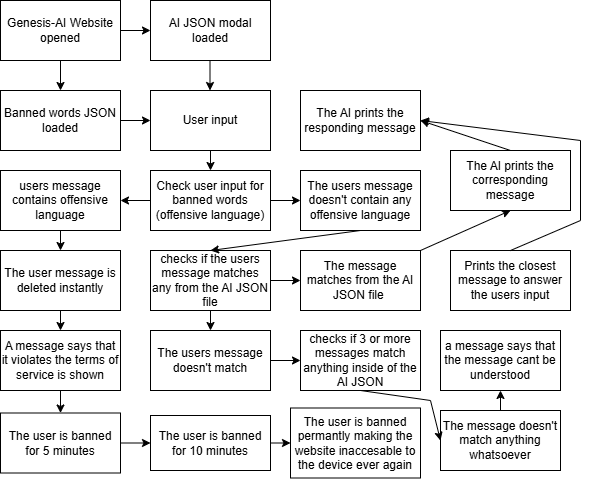
A configuration-driven chatbot, despite its simplicity, requires rigorous testing, a careful deployment strategy, and proactive maintenance to ensure high availability and accurate responses. Since the 'intelligence' is declarative, testing focuses less on statistical model performance and more on comprehensive rule coverage and logic verification. Testing Strategy: Testing involves two main phases: Schema and Logic Validation and Conversational Flow Testing. Logic validation should be automated, using a set of known-good user inputs and expected outputs. A test suite can iterate through an array of test objects (e.g., `{'input': 'What is the price?', 'expectedContext': ['PRODUCT_SELECTED'], 'expectedResponseId': 'PRICE_ANSWER'}`). The JavaScript test harness executes the `ConversationalEngine` against these inputs and compares the actual output and context flags against the expected values, flagging any discrepancy. This is critical for catching 'regressions' whenever the JSON modal is updated. Deployment Checklist: Because the system is entirely client-side (HTML, CSS, JS, and JSON), deployment is highly efficient. The checklist includes: 1) Verifying the JSON modal is publicly accessible and served with the correct `application/json` MIME type; 2) Ensuring all file paths in `index.html` and `app.js` (especially the modal URL) are correct for the production environment; 3) Enabling server-side compression (Gzip/Brotli) for the JSON and JS files; and 4) Implementing correct caching headers to ensure updates are propagated quickly. Continuous Monitoring and Maintenance: The primary maintenance task involves logging and analysis. The JavaScript engine should optionally log all conversational turns (user input, matched trigger ID, selected response, and resulting context flags) to a server-side endpoint or analytics service. Analyzing these logs helps identify common user queries that currently fall to the general fallback mechanism, indicating gaps in the JSON configuration that need new `responseTriggers`. Iterative Improvement Cycle: Maintenance follows a clear loop: analyze logs to find knowledge gaps -> author new `responseTriggers` and update the JSON modal -> run automated regression tests against the new modal -> deploy the updated JSON file. Because the modal is separate from the application code, this update cycle is extremely fast, allowing for continuous refinement and adaptation to evolving user needs without a full software redeployment.
We have successfully navigated the complexities of building a functional, resilient, and highly configurable AI chatbot using only client-side web technologies and declarative JSON modals. This journey demonstrates that sophisticated conversational agents do not always require massive computing power; often, carefully structured rules and context management are sufficient to meet specific business objectives and enhance user experience. The path forward for configuration-based AI involves scaling both the content and the underlying engine. Scaling the content means adopting advanced tools for JSON authoring—moving beyond manual text editing to specialized visual editors that enforce schema validity and simplify the creation of complex conditional logic and context requirements. As the knowledge base grows, developers may explore techniques like splitting the modal into multiple, topic-specific JSON files loaded on demand, using the root configuration as a manifest. Scaling the engine focuses on improving the efficiency of the rule-matching algorithm. While simple linear iteration through 100 triggers is fast, iterating through 5,000 becomes slow. Future improvements involve implementing optimized search algorithms, such as creating hash maps or trie structures in JavaScript based on the JSON keywords during initialization, allowing the engine to jump directly to relevant triggers rather than searching the entire array. This ensures that the chatbot remains performant even as the depth of its configuration increases. Finally, the future of this architecture lies in its integration with emerging hybrid models. While configuration-driven AI excels at deterministic tasks, it lacks true generative capability. A hybrid solution might use the JSON modal for 90% of requests (FAQs, support, transactions) but, upon matching a high-level `FALLBACK_TO_LLM` trigger in the JSON, it could initiate a secure, server-side API call to a minimal LLM for novel, truly open-ended queries. This combination leverages the cost-efficiency and control of configuration rules alongside the flexibility of generative models. In conclusion, the ultimate AI Guide has equipped you with the knowledge to build intelligent web applications where the core logic is transparent, adaptable, and easily maintained. By mastering HTML, CSS, JavaScript, and the declarative power of the AI Modal JSON, you are prepared to create powerful, client-side conversational experiences that are both robust and efficient. Embrace the elegance of configuration, and continue refining the digital personality you have brought to life.